Getting a website to rank on Google can feel like the hardest part of SEO. You research keywords, improve pages, publish content, and watch your positions move. Then you look at the business side and notice something is missing: the calls, enquiries, and sales have not increased in the same way.
That is where many businesses make the wrong move. They see traffic or rankings and assume the answer is more traffic. But a ranking is only the beginning of the customer journey. A person still has to notice the result, decide to click, find a page that matches what they searched for, understand the offer, trust the business, and know what to do next.
Recent SEO and conversion discussions increasingly use this full-journey approach. The recurring issues are not limited to keywords. They include search intent, weak search-result messaging, unclear offers, trust gaps, mobile friction, confusing forms, and poor measurement.
So if your rankings are improving but customers are not arriving, do not start by changing everything. Start by finding the broken step.
This guide looks at the problem first and then gives a practical solution for each stage.
1. Why Your Website Ranks but Still Gets Ignored and How to Make It Worth Clicking
A page can appear in Google and still lose the click.
This is the first problem to investigate because the search result is the first contact a potential customer has with your business. If the title is vague, the description says very little, or the result does not look relevant to the search, the user can simply choose another listing.

Why this happens
The page may be ranking for a phrase that is slightly different from what the searcher actually wants. Your title may focus on a company description instead of the customer’s needs. The description may list features without explaining the benefit. Competitors may also have clearer wording or stronger search-result features.
• Check Google Search Console for the exact queries creating impressions but few clicks.
• Rewrite the page title and meta description so they clearly match the searcher’s intent and make the service or answer obvious.
• Compare the wording of your result with competing results and improve the message without making misleading claims.
Look at the queries that generate impressions and compare your result with the pages appearing around it. Ask a simple question: if I were searching for this phrase, would this result immediately tell me that the page can solve my problem?
Make the title specific. Make the description useful. Match the language to the search intent. If the user is looking for a service, make the service obvious. If the user is looking for a local provider, make the relevant location clear.
This is where search engine optimization services need to go beyond “rank higher.” The goal is to make the ranking worth clicking.
2. How to Attract the Right Traffic, Not Just More Visitors
A website can have healthy traffic numbers and still have a weak customer pipeline.
The reason is simple: not every visitor is a potential buyer. A person searching for an explanation, a free tutorial, or a definition may be useful to your audience but may not need your service. A person searching for a provider, quote, consultation, or service in a specific location is much closer to a commercial decision.
Several current guides on traffic without leads put audience quality and search intent near the start of the diagnosis.

Why this happens
Businesses often choose keywords because they have high search volume. That can create impressive traffic but weak commercial relevance. Another problem is sending informational searches to pages that are designed to sell a service.
• Split target keywords by intent: informational, commercial, transactional, and local.
• Give high-intent searches a relevant service or solution page instead of sending every visitor to a blog post or homepage.
• Review lead quality by query and landing page, not just total sessions, so low-value traffic does not hide the real problem.
Separate your keyword strategy by intent.
Informational keywords can support helpful articles. Commercial keywords should usually lead to service, comparison, or solution pages. Local searches should lead to pages that clearly explain where you operate and what you provide there.
For example, search engine optimization services for small businesses are more commercially focused than a broad educational query about what SEO means. Likewise, b2b seo services should lead to a page that speaks directly to B2B needs instead of a generic SEO page.
The objective is not to attract everyone. It is to attract people who have a realistic reason to become customers.
3. How to Make Your Landing Page Match What People Are Searching For
Now imagine the right person clicks your result. They arrive on the website, read the first section, and still cannot tell whether they are in the right place.
This is one of the most important gaps between SEO and conversion.
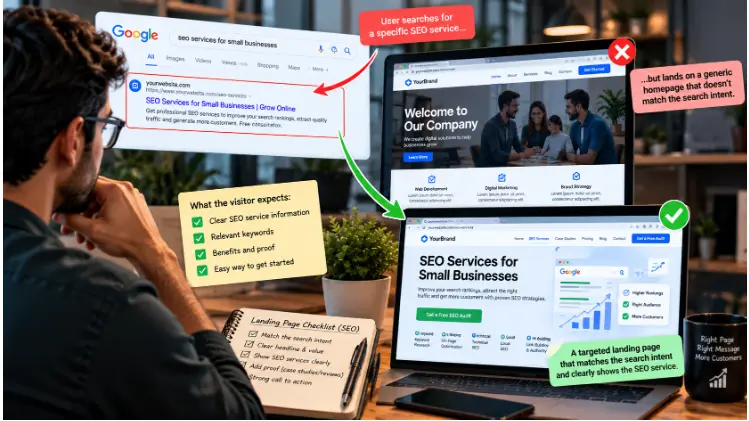
If someone searches for a specific service but lands on a generic homepage, an unrelated blog post, or a service page with a different focus, the visitor has to do extra work. Many will simply leave.
Why this happens
Keyword research and page planning are often done separately. A keyword gets assigned to a website, but nobody asks whether the page receiving the visitor actually satisfies the reason behind the search.
• Create a keyword-to-page map before publishing or optimising content.
• Make sure the page title, H1, opening copy and main offer directly answer the search that brought the visitor there.
• Use internal links to move visitors naturally from supporting content to the most relevant service or conversion page.
Create a clear keyword-to-page map.
A service keyword should normally have a relevant service destination. A local service search should have a useful local destination when appropriate. An informational question should lead to content that genuinely answers the question.
This is also where on page seo services become practical. Headings, copy, internal links, and page structure should help the visitor move from the problem they searched to the solution you provide.
The first few seconds matter. The visitor should immediately understand what the page is about, who it is for, and what they can do next.
4. How to Turn Your Service Page Into an Answer to the Customer’s Problem
A common service-page mistake is writing about the company before explaining why the visitor came.
A page may say that a company is experienced, professional, and committed to quality. Those statements sound positive, but they do not answer the visitor’s most important question: “Can you solve my specific problem?”

Why this happens
Businesses naturally want to talk about their services, technology, team, and experience. The problem is that the visitor is usually thinking about their own situation.
• Rewrite the opening section around the customer’s problem, not a list of company achievements.
• Explain the problem, the consequences, the service response, what is included, and what the customer should expect next.
• Add relevant proof such as case studies, examples, process details, and genuine customer evidence where available.
Build the page around the problem first.
Explain what the customer is dealing with. Show what can happen if the issue is ignored. Introduce your service as the practical response. Explain what is included, how the process works, and what the customer can expect.
Then add the proof.
This is more useful than filling the page with repeated keyword variations. A strong organic search engine optimization services page, for example, should explain how the service connects research, technical work, content, and measurement to a real business objective.
The keyword helps the visitor find the page. The page itself has to earn the enquiry.
5. How to Build the Trust That Turns Interest Into Enquiries
Sometimes the page is relevant, and the visitor is interested, but they still do nothing.
Trust can be the missing step.
When a customer is considering a service, they may want to know whether the provider has done similar work, whether the process is clear, what happens after they enquire, and whether the business looks established enough to handle the job.

Why this happens
A website may contain big claims but little evidence. There may be no useful case studies, weak testimonials, unclear team information, vague process descriptions, or no explanation of what the customer can expect.
• Replace broad claims with evidence: relevant work, testimonials, case studies, credentials, and a clear process.
• Answer common concerns before the visitor has to ask them, including scope, timelines, communication, and what happens after enquiry.
• Keep proof close to important decision points so visitors do not have to search the site for reasons to trust the business.
Give the visitor evidence instead of extra promises.
Use genuine testimonials where available. Show relevant work. Explain your process. Add case studies that describe the problem, the work completed, and the outcome without making unsupported claims.
For an organic seo services company, this could mean explaining the audit process, keyword research, technical improvements, content work, and reporting approach instead of simply saying “we guarantee growth.”
Trust is not created by adding more adjectives. It is created by reducing uncertainty.
6. How to Make the Next Step Easy for Visitors
A visitor can understand your service and still leave because contacting you feels like work.
This often happens on service websites where the only call to action is hidden at the bottom of a long page. It can also happen when a form asks for too much information, the phone number is hard to find, or the page gives visitors several competing actions.

Why this happens
The business has designed the page around information but not around the next decision.
• Choose one primary next action for each important page and make it visible near the decision point.
• Reduce unnecessary form fields and explain what happens after submission.
• Offer suitable alternatives such as phone, email, consultation, or quote requests when they genuinely help the visitor move forward.
Choose the most useful action for the page and make it obvious.
If the visitor is comparing services, a consultation or quote request may make sense. If they are still researching, a useful guide or case study may be a better next step.
Keep the CTA visible without making it aggressive. Reduce unnecessary form fields. Explain what happens after the form is submitted. Make phone, email, or other contact options easy to find.
The principle is simple: do not make a visitor solve another problem just to ask you for help.
A clear conversion path also makes it easier to understand whether your SEO work is producing business value rather than only website activity.
7. How to Keep Mobile Visitors From Leaving
A customer may discover you on a phone even if the website was designed on a desktop.
If the page is slow, difficult to scan, or awkward to navigate, a visitor can leave before they understand the service.

Why this happens
Long blocks of text, tiny buttons, crowded menus, intrusive pop-ups, and difficult forms create friction. A page can technically contain everything the visitor needs and still be difficult to use.
• Test the highest-value pages on a real phone, not only in a desktop browser.
• Fix slow-loading elements, hard-to-tap buttons, crowded navigation, intrusive pop-ups, and difficult forms.
• Check that the first mobile screen communicates the service, value, and next step without forcing the visitor to hunt for information.
Review your highest-value pages on an actual mobile device.
Check the first screen. Can the visitor understand the offer? Can they find the service details? Is the CTA easy to tap? Does the contact form work comfortably? Can the page load without making the visitor wait?
Mobile seo services should not be treated as a separate technical task. Mobile experience is part of the journey that begins with the search result and ends with the enquiry.
If the mobile journey is weak, improving rankings can simply send more people into the same problem.
8. How to Fix Technical SEO Issues That Hide Valuable Pages
Not every customer problem is visible on the page.
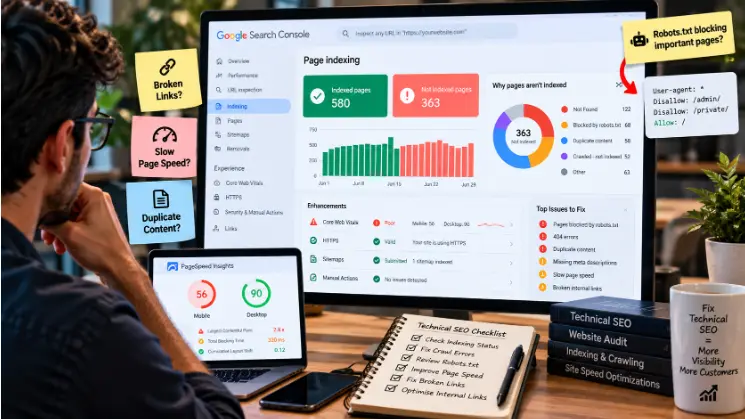
A useful service page can still struggle when search engines cannot access it properly, important URLs are not indexed, internal links are weak, redirects are confusing, or technical issues slow the experience.
Google’s own Search Console guidance recommends checking patterns by query, page, country, and device when diagnosing search performance, and it points site owners toward indexing, crawling, and page-level investigation when problems occur.
Why this happens
Businesses often keep publishing new content while older, commercially important pages have unresolved technical issues.
• Audit the commercially important pages first for indexing, crawlability, redirects, broken links, internal links, and performance issues.
• Use Search Console and a technical SEO audit to identify which problems affect real pages and search demand.
• Prioritise fixes by business impact instead of trying to clear every technical warning at once.
Start with the pages that matter to the business. Use technical seo audit services to check indexing, crawlability, redirects, broken links, page speed, internal linking, and other issues that can affect important URLs.
Do not treat every audit warning as equally important. Prioritise the problems that can affect visibility, usability, or conversions.
Technical SEO should support the customer journey, not become a list of technical tasks with no connection to business goals.
9. How to Make Your Local Search Presence Match the Areas You Serve
If your business serves a defined location, customers may search with the location included. They may also compare local providers before deciding who to contact.
A website can have good national visibility and still miss relevant local demand if its service areas are unclear.
Why this happens
The website may not have useful location pages, local service information may be too thin, or the site may simply mention a city without explaining what is actually available there.
• Create useful local relevance around the areas the business genuinely serves.
• Explain local services, customer needs, service coverage, and contact options instead of simply repeating city names.
• Connect local pages with relevant internal links and keep location information consistent across the website and business profiles.
Make local relevance useful.
Explain the services available in the area, who you serve, what problems you solve, and how customers can contact you. Use local keywords where they genuinely match the market.
Terms such as seo services florida, seo services in florida, and local search engine optimization service can be useful when they reflect real service areas and real search demand.
Local SEO should help a customer answer one practical question quickly: “Can this business actually help me here?”
10. How to Measure SEO by Customers, Not Just Rankings
A report can show better positions and more clicks while the business owner still asks why sales have not changed.
That does not mean rankings are useless. It means they are only one layer of measurement.
Why this happens
SEO reports often stop at impressions, clicks, positions, and traffic. The information becomes much more useful when it continues into enquiries, calls, quote requests, bookings and qualified leads.
• Connect ranking and traffic data to enquiries, calls, bookings, quote requests or sales wherever possible.
• Identify pages that attract visits but produce little action, then inspect the intent, page relevance, trust and conversion path.
• Report SEO as a journey from query to click to page engagement to business action rather than stopping at rankings.
Build a measurement path from search to action.
Track which queries and pages bring visits. Then look at what those visitors do. Which pages generate enquiries? Which pages receive traffic but almost no action? Which devices produce more friction? Which forms are started but not completed?
This is where search engine optimization strategy services should connect SEO activity with business measurement.
A website with fewer visitors but better-qualified enquiries can be more useful to a business than a website with much larger traffic and little commercial value.
The goal is not to make the analytics dashboard look impressive. The goal is to understand whether the search strategy is bringing the right people to the right pages and helping them move forward.
How to Diagnose the Problem Before Changing Your SEO Strategy
Before ordering more content, more backlinks, or a complete website redesign, work through the customer journey in order:
Search result → Click → Relevant page → Understanding → Trust → Action → Enquiry.
At each stage, ask what the data and the page are telling you.
If impressions are strong but clicks are weak, investigate the search result and intent. If clicks are coming from irrelevant queries, revisit keyword targeting. If visitors leave quickly, inspect the landing page and mobile experience. If visitors engage but do not enquire, review the offer, proof, and CTA. If enquiries appear to be missing from reports, check tracking and lead handling.
This diagnostic approach is consistent with current SEO and conversion guidance, which recommends finding the specific break point instead of automatically buying or producing more traffic.
The benefit is simple: you solve the problem you actually have.
Final Thoughts
Your rankings are not the final result. They are one step in a much longer journey.
A website can rank well and still struggle to bring customers when the search result does not earn clicks, the wrong audience arrives, the landing page does not match the search, the service offer is unclear, trust is weak, the mobile experience is difficult, or the enquiry path creates friction.
That is why SEO should be treated as a customer journey rather than a ranking report.
Start with the problem. Find the stage where potential customers are being lost. Fix that stage. Then measure what changes.
When search intent, useful content, strong service pages, technical SEO, trust, and conversion work together, rankings are much more likely to produce the outcome a business actually wants: relevant people finding the website and taking a meaningful next step.
FAQs
Why does my website rank but not get customers?
Ranking only proves that your page is visible for a search. Customers still need to click, find a relevant page, understand the offer, trust the business, and complete the next step. A weakness at any stage can reduce enquiries.
Is more website traffic always better?
No. Traffic quality matters. Visitors who are genuinely looking for your service are more relevant to lead generation than large numbers of people searching for unrelated or purely informational topics.
What should I check first?
Start with the search queries, landing pages, and conversion path. Find out whether the problem is low clicks, poor traffic quality, page relevance, trust, usability, CTA friction, or measurement.
Can SEO generate leads?
Yes, when SEO attracts relevant search demand and the pages receiving that traffic are designed to answer the search and support a clear next action.
What should search engine optimization services include?
Depending on the business, SEO can include keyword and intent research, technical SEO, on-page optimisation, content, internal linking, local SEO, measurement, and ongoing improvement. The exact mix should follow the site’s actual problems.